C/C++ development setup is not a trivial problem, especially for beginners. Most beginner tutorial on the subject, almost always advised to use Integrated Development Envionment (IDE) such as Visual Studio or Code::Blocks. It is advised this way, because this is the most obvious and fastest way to start writing code. But, there is a chance that, people who is beginner and wanted to setup project without using IDE. Just like me.
In this article, i will give you the easiest way to setup C/C++ project without much hassle and arguably beginner friendly.
The Non-trivial Part
To setup C/C++ project (not just an "Hello World"), we need code editor, compiler, and build system. For code editor, you can choose whatever code editor you like and for compiler you just have to download the compiler that match your operation system and architecture. But, for build system is pretty tricky. Most C/C++ codebase you found most likely use Make or CMake to build the project. But, in my experience, these option are not beginner friendly. These tools is a complete different technology and have it's own language. So, the learning curve is quite high. Most of us most likely do not want to learn an entire new technology to finally start writing the real C/C++ code.
My Recommendation
I have tried some of them, found them to be confusing. Moreover, for CMake and Make, the error messages that generated when you make mistakes are not useful for most of the time and hard to comprehend because the cryptic words that are seems too descriptive for beginner.
I advised you to use Scons. As the front page stated, this an easier, more reliable, and faster substitute for Make. The best part of Scons is, it used Python as the language to write the build logic. So it is easier for beginner and can be used right away.
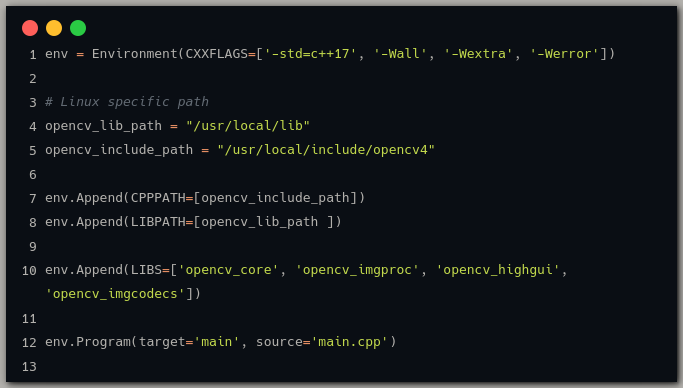
As you can see at the image above, it looks just like a regular Python script. This also means it looks less intimidating than Make or CMake config file. Moreover, the error message are also just like Python. Easy to read, undestand, and useful.
Conclusion
After read this article, I hope you can found some confidence to start building your big C/C++ project with simpler tooling. IDE is great, but you can still write code and build project without it.
Remember, simpler tools means easier to setup, easier to replicate, and took less computing power to use.