There is a lot of ways to create your own blog these days. Most people would most likely do it in some combo of frameworks. But for personal use, you have a complete choice to use any technology you want. In this blog, i will tell you the simplest way to make your personal blog in Go without any dependency or third party library.
Design The Page
First of all, we have to make the design of our web page in HTML and CSS. Because, if we bad at CSS (i'm suck on CSS), we can use LLM to do it for us. Make sure to have specific web page design in mind before prompting. For example, I like to make it simple and comfortable to read, so i design my web page (literally this blog) to be the same as a paper page inside a book. After we finish the design, we can proceed to the next step.
File Format for The Blog's Content
Before we make the system, we had to choose a file format for you to write your blog's contents. This is can be a huge advantage because it's easier to write in rather than directly in the HTML file. The most common file format is Markdown file. Markdown is used everywhere these days. From README file, to prompting and organize Coding Agent. So, if you don't know it yet, learning Markdown can be a good knowledge to have.
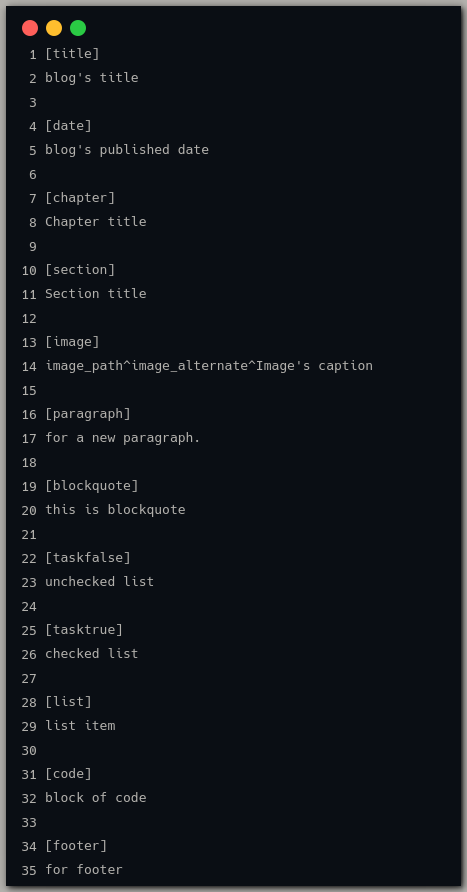
But for this blog, we will use my own file format called XD. This file format much more simpler than Markdown and i like to make my own solution rather than using an existing one (I'm highly recommend you to do the same way :)). This file format literally just a way to tag a specific part of the blog's content and later will be injected to predefined HTML tag. Here's are all the tag:
Parser for The File Format
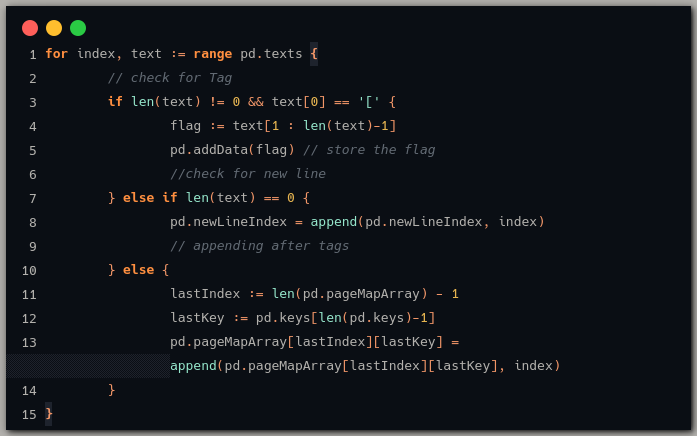
After that, we can create the parser for the file format. For this case its called XD Parser. To do it, first, we have to open and store everyline of text inside the XD file. And then store every tag and every line below it. Here's the code to read the XD file, read every line, check tags, and the store it.
As i said before, every tag will be translated to predefined HTML tag. For example tag "TITLE" will be translated to "h1", tag "CHAPTER" to "h2", and so on. Here's the implementation.
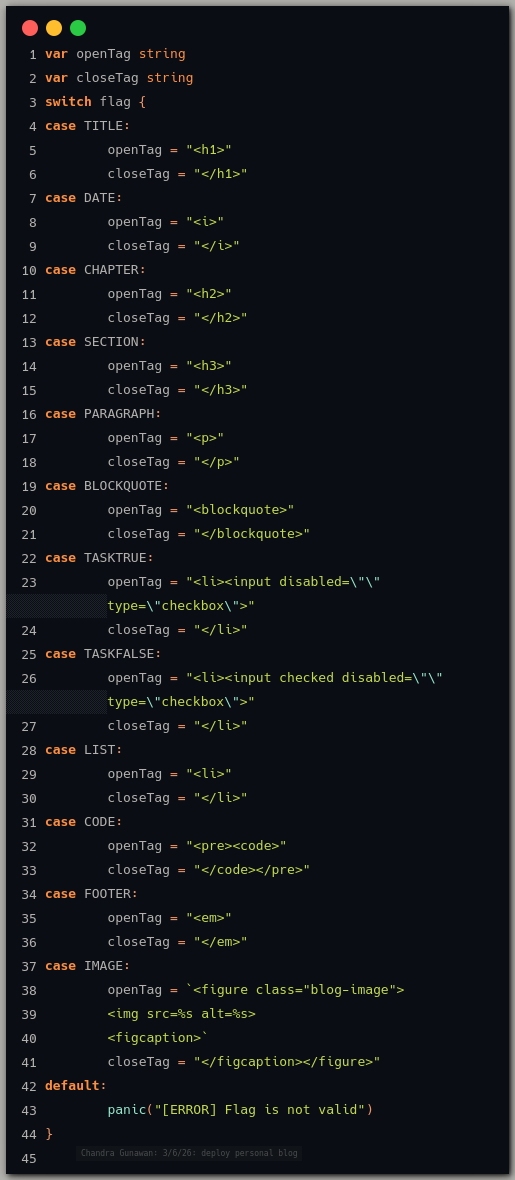
The result of parsing the XD file is stored as multiline string. Simple.
The Blog System
The idea of the blog system is really simple. We just need to make a system that compose the HTML file based on our file format. So, all we need is a way to crate a file and write the file from generated strings that we had from our parser and then save it with .html file extension. Here's the implementation.
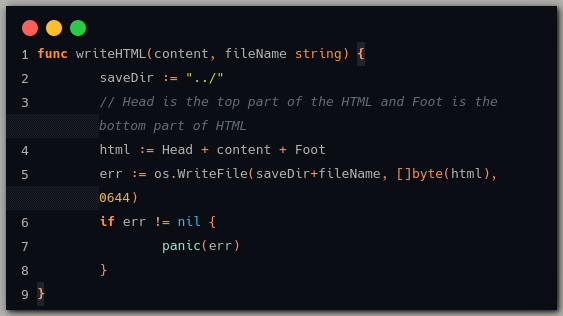
The function receive the data we got from the parser and the name of its files. And also, The "Head" and "Foot" variables are based on our design in the first step, so the generated HTML files are on the same look and design (like this blog).
After all that, we can run the program with command "go run" to get our generated HTML file.
Conclusion
That's how to make a simple personal blog in Go with custom file format. When writing this blog, i realize that this system also can be used to generate manual for a library/framework.
I'm sorry if there is something confusing or doesn't make sense. I'm just starting out on writing technical post. If you had any feedbacks, feel free to DM me on my social media or you can email (can be found on the front page). Thank you for reading this and i hope you learn something new. See you :)